Windows · native GUI · MIT open source

Turn any key into rapid-fire

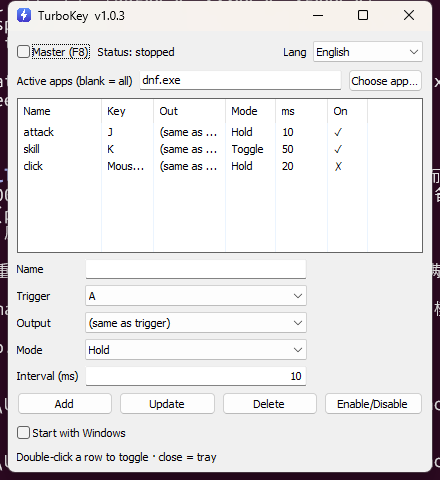
A lightweight Windows auto-fire tool. Bind a key to repeat itself — or another key — automatically, while held or as an on/off toggle. Each rule has its own interval. Works with normal apps and with games.

Free · single self-contained .exe · no runtime to install · requires Windows 10/11

TurboKey
Features

Small tool, no compromises

Everything you need to automate a key, and nothing you don't.

Hold or toggle

Repeat while a key is held, or press once to start and again to stop. Each rule its own mode and interval.

Keys & mouse buttons

Trigger and output can be any keyboard key or mouse button — left, right, middle, X1, X2.

Works with games

Keys are injected as hardware scan codes via SendInput and held briefly, so poll-based and DirectInput games sample them reliably.

Per-app scope

Limit rapid-fire to specific apps by process name, or pick from running programs. Leave blank to work everywhere.

System tray & autostart

Closing minimizes to the tray; a global F8 master switch toggles everything. Optional start with Windows.

13 languages

Localized UI auto-detected from your OS, including fully mirrored right-to-left Arabic and Hebrew layouts.
How it works

Up and running in four steps

Install

Download turbokey.exe and launch it. Accept the UAC prompt — elevation lets it reach games that run as admin.

Add a rule

Pick a trigger key, an output key, a mode, and an interval in milliseconds, then click Add.

Enable

Press F8 (or tick the master switch) to arm the tool globally.

Fire

Hold or tap your trigger key and it repeats automatically. Press F8 again when you're done.

How does it stay reliable? A low-level keyboard hook swallows your trigger key and emits clean down → hold ~30ms → up pulses tagged so the tool never re-triggers itself. The interval is the gap between presses; the practical ceiling is ~25–30 presses/second, which is plenty since games sample input per frame.
Localized

Available in 13 languages

Auto-detected from Windows, switchable in-app. Read the docs in your language on GitHub.